An accountant receives an email “from a regular supplier”: the bank details have changed, please pay the new invoice today. The message looks like every other one, the money goes to a fraudster and it almost never comes back. The owner then asks where the hole was. Was it the mailbox, the people or the payment rules? This guide shows how to stop invoice scams in three layers: the email domain, the payment process and the team. It ends with a one-page checklist and a plan for the first hours if money has already gone.
How invoice scams work and why a fake invoice email so often succeeds
Business email compromise, or BEC, is fraud in which an attacker imitates or takes over a business mailbox to redirect a payment. In the common version, the attacker watches a real exchange with a supplier, then sends the next invoice with a different account number. The fake invoice scam works because nothing in it looks wrong: the thread is real, the tone is familiar and the amount is expected. It also works because a payment sits between two departments, and each assumes the other has checked it.
Layer 1: protect the email domain with SPF, DKIM and DMARC
What each record does
- SPF lists the servers allowed to send mail for your domain.
- DKIM signs each message so the receiver can see it was not altered.
- DMARC tells receiving servers what to do when SPF or DKIM fail: monitor, quarantine or reject.
Microsoft’s overview of business email compromise lists DMARC among the measures that reduce spoofing of your domain. Start DMARC in monitoring mode, read the reports for a few weeks, fix legitimate senders, then move to quarantine and reject. A correct DMARC setup protects your customers from fake mail in your name, but it does not stop a fraudster who writes from a lookalike domain, so the next two layers matter as much.
Mailbox protection
Turn on two-factor authentication. Do it for every mailbox, flag messages from outside the company and review forwarding rules, since attackers often hide copies of mail there. The US Secret Service guidance gives the same advice and adds registering lookalike domain names. Our DevOps services cover mail authentication and access policies for business domains.
Layer 2: payment rules that stop invoice scams even with a perfect email
- A change of bank details is accepted only after a call to the number from the contract, never the number in the email.
- A new account gets a cooling-off period before the first payment.
- Payments above a set amount need two approvals from different people.
- Vendor details are changed by one named person, not by whoever received the email.
- The payer sends the supplier a note with the bank name and the last digits of the account used.
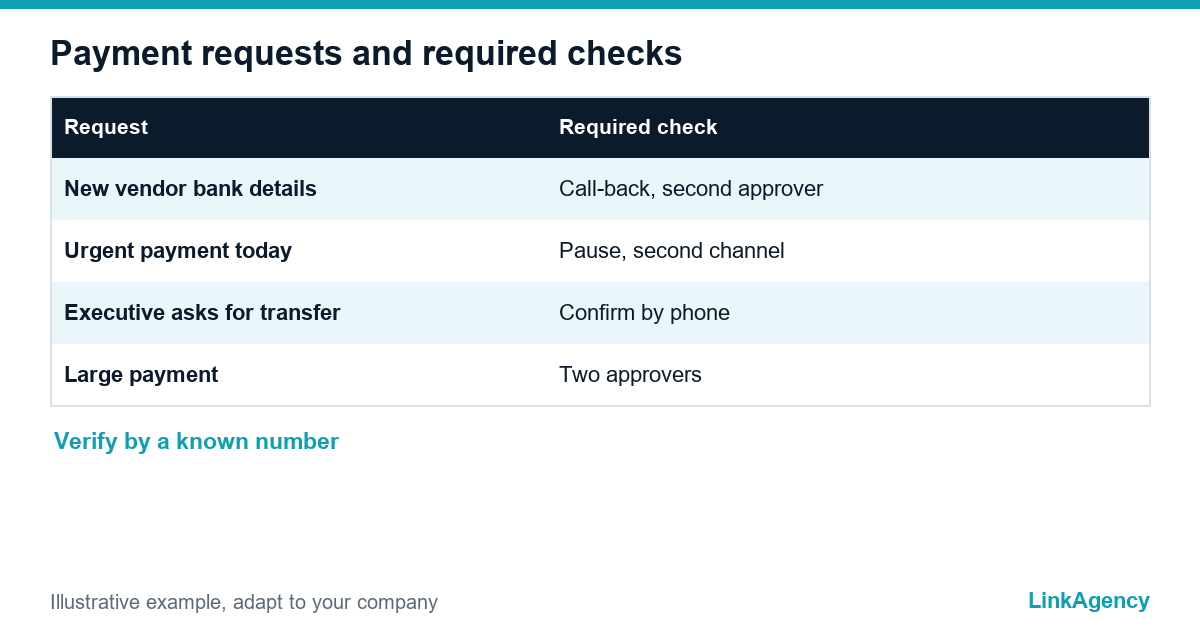
| Request | Required check |
|---|---|
| New vendor bank details | Call-back to the number in the contract, second approver |
| Urgent payment “today” | Pause and confirm in a second channel |
| Executive asks for a transfer by email | Confirm in person or by phone before paying |
These payment verification rules work because they do not depend on the email looking suspicious. The finance team can follow them even when the message is flawless. They stop fake invoices at the door. One invoice can send a payment to one of the scams that target busy finance teams.
Layer 3: a short instruction for accounting, assistants and executives
Write one page. Keep it near the payment screen. It should say who may change vendor data, which channel confirms a change, what to do with an urgent request from a manager and whom to tell about a suspicious message. Run a short drill twice a year with a harmless test email, and ask the team to report it within the hour, not to delete it, so that reporting becomes a habit rather than an embarrassment. Executives and their assistants need the same instruction. A fake request that appears to come from the chief executive is a classic version of the scam. Scam invoice emails often target the assistant first.
AI-written emails and voice fakes: what changed and which checks no longer work
AI tools make a fake invoice scam fluent and personal, so “spot the typos” no longer works as a defense. The same is true of a familiar voice on the phone, since voices can be imitated. Rely on process instead: a call-back to a known number, a second approver and a written change request. A message that is perfectly written and still asks you to skip the process is the warning sign. Treat every fake invoice email that way.
If the money has already gone: the first hours, bank, police and notices
- Call your bank at once, tell them it is a fraudulent transfer and ask them to recall or freeze it.
- Contact the police through a channel other than the compromised mailbox.
- Change passwords and keep the original emails as evidence.
- Report the case to the Internet Crime Complaint Center if you are in the US, or to your national authority.
- Tell your insurer and the supplier whose name was used.
Speed matters. Keep the bank’s fraud line and the owner of each step on the checklist.
One-page checklist for the finance department
- SPF, DKIM and DMARC are set and the reports are read.
- Two-factor authentication is on for every mailbox.
- Bank detail changes are confirmed by a call to a known number.
- Large payments need two approvers.
- The team knows the one-page instruction and the plan for lost money.
If invoices arrive by email in volume, an invoice processing automation guide shows how to add automatic checks, and the website security checklist covers the rest of your digital perimeter.

Order an email domain check before the next invoice scam
You can order an email security check as a short, separate task. We look at SPF, DKIM and DMARC, two-factor protection and the payment process, and give a short list of recommendations.
Free email domain check against invoice scams
We check whether SPF, DKIM and DMARC are set, whether two-factor protection is on and where your payment process can be fooled, then send a short list of fixes. You can also order an email security check as a separate task.
- a report on your domain records and mailbox protection;
- a one-page payment verification rule set for finance.
Leave a request and we reply within one business day.

Frequently Asked Questions (FAQ)
What is business email compromise?
Fraud in which an attacker imitates or takes over a business mailbox to redirect a payment or collect data. A fake invoice with new bank details is the most common version.
What is the single most effective rule against fake invoices?
Never accept a change of bank details by email alone. Confirm it by calling a number you already had, from the contract or earlier records, before the first payment.
Does DMARC stop fake invoice emails?
It stops others from sending mail that pretends to come from your exact domain. It does not stop emails from lookalike domains or from a hacked supplier mailbox, so payment rules are still needed.
How can I tell an AI-written scam email?
Often you cannot, because the text is fluent. Judge the request, not the writing: a change of details, urgency and a push to skip the usual process are the signals.
What should I do first if a payment went to a fraudster?
Call the bank immediately and ask it to recall or freeze the transfer, then contact the police through another channel and keep the original emails as evidence.
Who should be able to change supplier bank details?
One or two named people with a second approver, using a written request and a call-back. The person who received the email should not make the change alone.
How do I order an email domain check from LinkAgency?
Leave a request with your domain name. We check the mail records and the payment process and send a short list of recommendations with a quote for the work you choose.