Meta has told advertisers that from October 28, 2026, ads that are already running on Facebook and Instagram will get product browsing switched on by default. A person who taps your ad may land on a product page inside the app instead of your site, a month before Black Friday. Whether it helps or hurts Meta catalog ads depends on your catalogue, your margins and how you read your reports, and catalog ads on Meta are only one part of the picture. This guide shows how to decide, test and keep control, without panic.
Meta Catalog Ads Change on October 28: What the Notice Says
According to PPC Land’s report on the notice, the message says that Meta will add product browsing to existing ads on October 28, and that people who tap the ad “may see an experience on Facebook or Instagram with product info and personalized suggestions”. Product browsing is not a new feature. It already sat among the Advantage+ creative options of Meta Advantage+. What changes is the default for live ads, which moves from off to on unless you opt out.

What Is Confirmed and What Is Still Unclear
Confirmed in the notice: the start date, the opt-out button, the option to switch product browsing on or off at any time in the Advantage+ Creative and Destination settings, and Meta’s claim of 3% more conversions on average in a test from August 6 to 21 across about 117,700 advertisers. Unclear: which conversion events were counted, what the control group was, whether new ads created after October 28 will also get the default, which formats and placements are affected, and whether the opt-out button covers one account or several. At the time of PPC Land’s report on October 15, Meta had not published a Help Center article. Treat the 3% as a vendor claim, not as your own result. This is not Meta’s first default flip: its Dynamic Media setting for Advantage+ catalog ads switched on in the same way from September to October 2025, with an API opt-out that this notice does not mention. Some agencies also warn that the personalised suggestions may show other products next to yours.
Who May Benefit From Product Browsing and Who Should Opt Out
For Meta’s catalog ads, a wide catalogue with similar margins and impulse purchases may gain from an in-app product page. A narrow range, a brand that sells one hero product, or a business where margin differs a lot between items has more to lose. The StoreHero analysis shows with illustrative numbers how 3% more conversions can still reduce profit if buyers switch to cheaper items. Check your own data before you decide.
| Situation | Likely approach | Why |
|---|---|---|
| One hero product, strong creative tests | Opt out | Keeps creative results readable |
| Wide catalogue, similar margins | Test on part of the campaigns | Browsing may add sales |
| Margins differ a lot between items | Opt out, then test with a locked product set | Cheaper items may take over |
| No clean product feed | Opt out | Suggestions need good data |
| Strict reporting or consent rules | Opt out until checked | An in-app layer changes what your site sees |

How to Opt Out and Where to Check Each Ad
There are two routes, and it is safest to use both.
Opt-out steps
- Open the notice in your ad account and use the “Opt out” button before October 28. Check which account it names, because the notice itself may not say.
- Open each important live ad, go to Advantage+ Creative and Destination settings and turn product browsing off.
- Recheck new and duplicated ads, since some advertisers report the setting can come back after duplication.
- Make edits outside peak hours, because changing a live ad can send it back through review.
- Write down the date and the person who changed each setting.
How to Test Meta Catalog Ads Safely on Part of the Campaigns
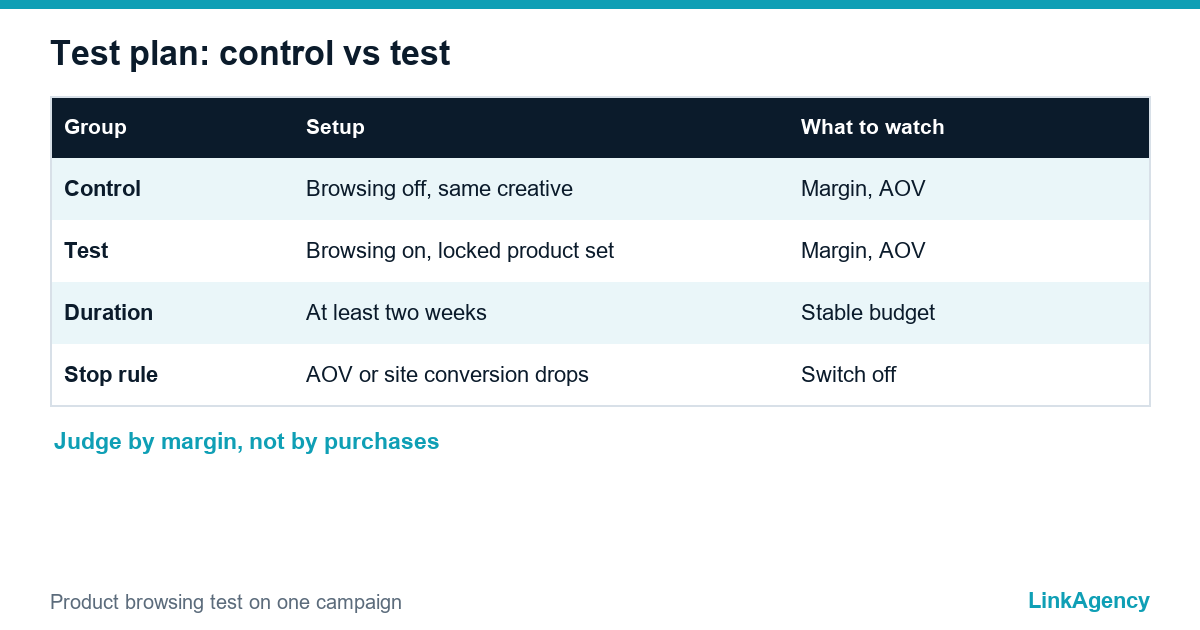
If you want to try the feature, do not switch it on everywhere. Pick one campaign, split the budget into a control group and a test group with the same creative, and run both for at least two weeks. Lock the product set to items with healthy margin and judge the result by contribution margin after ad spend, not by purchases or ROAS alone. Stop the test if average order value or site conversion rate drops. Treat it like any facebook dynamic product ads test. Our guide to six checks before scaling Meta ads covers the measurement basics.
What to Check in Analytics, the Catalogue and Cookie Consent
An in-app layer sits in front of your landing page, so check three things. Compare Meta clicks with sessions and site conversion rate for the weeks before and after, using analytics. Clean the catalogue behind your Meta ads catalog by removing out-of-stock items, wrong prices and weak images. Your ads depend on the catalog, and Meta reads it daily. EU sellers should also review whether your consent setup still fits, since the ePrivacy rules in Directive 2002/58 and the GDPR still apply to what you track. If a shop platform sits behind your catalogue, an ecommerce development team can help with feed and tracking.
A Monthly Checklist for Default Settings
Platforms change defaults often. Product browsing and opt out of defaults should be part of a short routine, and catalog ads in Meta need it most. Once a month, open each ad account and review the notices, the Advantage+ settings, the placement controls and the destination of your top ads. Keep a change log and compare weekly orders, average order value and margin before and after every platform change. A free Meta ads audit by a performance marketing team can speed this up the first time. Our checklist for the Google Universal Cart shows the same logic on the Google side: clean product data and clear tracking help in every channel.
Get a Free Meta Ads Account Audit From LinkAgency
We check which settings are on by default, where your ads really send traffic and how this shows in your analytics, and we send a short list of changes before the season. If you want it handled, you can order a Meta ads audit with the fixes.
- review of Advantage+ and destination settings;
- check of catalogue, tracking and consent;
- test plan for product browsing and a monthly checklist.
Send a request and we will reply within one working day.

Frequently Asked Questions (FAQ)
What happens if I do nothing before October 28?
Product browsing switches on for your existing ads, so a tap may open an in-app product page. You can still turn it off later in the Advantage+ Creative and Destination settings.
Can I turn product browsing off after October 28?
Yes. Meta says you can switch it on or off at any time in those settings, but you have to do it ad by ad, so keep a list of the ads you changed.
Will new ads also get product browsing by default?
The notice speaks only about existing ads, and Meta has not clarified new ones. Check each new ad and each duplicate before you publish it.
Is Meta’s claim of 3% more conversions reliable?
It is Meta’s own test, and the notice does not define the conversion metric, the control group or the averaging. Use it as a reason to test, not as a result for your account.
Does this affect my analytics and cookie consent?
It can, because the tap may stay inside the app before any visit to your site. Compare clicks, sessions and conversion rate before and after, and review consent rules if you sell in the EU.
Can LinkAgency audit my Meta ads account?
Yes. We review default settings, destinations, catalogue and tracking and send a priority list. Send a request and we reply within one working day.