A shopper saves a pair of trainers in Google’s AI Mode, adds a jacket from another retailer while chatting with Gemini, and checks out a day later after a price-drop alert. Your website may never see the first two steps. That is the practical meaning of the Google Universal Cart, which went live in the US on October 15, 2026, and it is why the Universal Cart from Google belongs on every owner’s agenda. This guide for store owners is a readiness checklist, not a news recap, and it shows what to fix first.
Google Universal Cart for Merchants: What Launched and Where It Works
According to Google’s launch post, the cart sits inside Search and the Gemini app, holds items from different stores, tracks price drops and restocks, shows promo codes and card perks through Google Wallet, and lets shoppers pay with Google Pay or move the items to the merchant’s own cart. Google states that the merchant remains the seller of record and handles confirmation and support.
The rollout is US-only for now. Google’s roadmap names Canada, Australia and the UK later, and the announcements say nothing about the EU. YouTube and Gmail, mentioned at the May preview, were not part of the launch, and Google has not published fees, ranking rules or the number of participating merchants, as PPC Land noted. Treat any promise of extra sales with caution.

How the Buyer’s Path Changes: From Your Site to a Cart in Search and Gemini
The old path was search, click, browse your store, add to cart. The new one lets a shopper collect products from several retailers inside Google and come back later through an alert. A universal basket on Google surfaces is still a cart that the shopper controls, because the tool saves, watches and suggests, but a person decides when to buy. Even so, with Google’s Universal Cart more of the decision happens before anyone reaches your site, and your product page competes with a Google card.
Your site keeps the jobs Google does not take over: stock, shipping, returns, support and the legal relationship with the customer. If you want to improve what happens after the click, start with the product page checklist and the checkout fixes in our guide to cart abandonment.
What Your Store Needs for the Google Universal Cart: Data, Prices, Stock, Returns
Google builds the cart on its Shopping Graph, which draws heavily on Merchant Center feeds, so a lagging feed can trigger a wrong price-drop alert or none at all, and the same accuracy matters in every sale, as the Black Friday checklist shows for sale prices. Treat Google Merchant Center product data as your storefront and review these items.
| Item | What to check | How often |
|---|---|---|
| Titles and attributes | Brand, size, colour, GTIN, clear title | Monthly |
| Price | Feed matches the page, sale prices included | Daily |
| Stock | Availability matches the warehouse | Daily |
| Images | Clean, sharp, no overlays | Quarterly |
| Shipping and returns | Terms identical in feed and on site | Quarterly |
This is ordinary product feed optimization of your Google Shopping feed, and it pays off in every channel, including agentic commerce and AI shopping agents, and a clean catalogue matters just as much for Meta catalog ads. Start with your top 20 products.
Platform and Merchant Center Checks: Shopify, WooCommerce, Custom
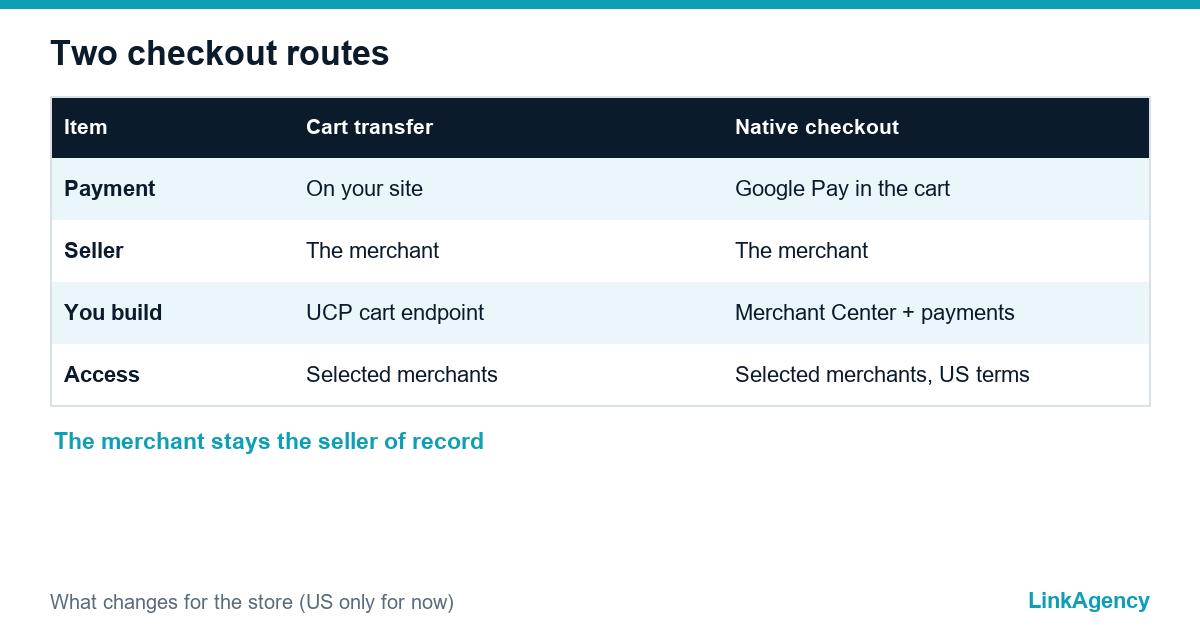
Universal Cart checkout has two routes, and Universal Cart readiness differs for each. With cart transfer, the shopper finishes on your site, and Google’s Cart API guide asks for the Universal Commerce Protocol version 2026-04-08, a profile at /.well-known/ucp and the cart capability. With native checkout, payment happens in Google Pay, which needs a payment provider that accepts a Google Pay token. Onboarding, per PPC Land’s reading of Merchant Center pages, still depends on Google selecting the merchant.
Checks by platform
- Shopify: reports say eligible stores were matched to Merchant Center and switched on by default in September, so check the setting and turn it off if you want orders on your own domain.
- WooCommerce and other platforms: ask your plugin vendor or agency in writing whether UCP and Merchant Center checkout are supported, and since when.
- Custom stores: the cart endpoint is a small API job, ideally answering in under a second.
How to Track Orders That Do Not Start on Your Site
Add this to your plan before any Universal Cart checkout traffic arrives. According to analysts’ reading of the UCP documentation, retailers get a single request when the shopper transfers the cart, and earlier saves stay inside Google. That means no add-to-cart event for abandoned-cart emails or retargeting, so give the return link UTM parameters, mark these orders in your CRM and compare them with the existing channel report. If the link has no tag, the visit may look like direct or organic traffic. Our ecommerce development team can set this up with the checkout.

GDPR, EU Consumer Law and What to Expect in Europe
Nothing is announced for the EU, so you are preparing early, not racing. When a channel arrives, the old rules still apply: the consumer information and withdrawal rules of the Consumer Rights Directive, clear returns terms and GDPR duties for customer data. Find out what data a new channel shares with you, who is the processor, and update your privacy notice before you switch anything on.
A 30-Day Plan: What to Do Now and What Can Wait
- Week 1: export the top 20 products and compare price, stock and titles in the feed and on the site.
- Week 2: fix feed errors in Merchant Center and align shipping and returns text.
- Week 3: ask your platform vendor about UCP, and agree UTM rules for transferred carts.
- Week 4: add a report for orders outside the site and decide who owns the feed.
Treat the Universal Cart readiness plan as housekeeping and wait for Google to publish fees, ranking rules and the EU timeline before changing strategy or paid budgets, and revisit the ad side with your Google Ads management team once it does.
Get a Free Store Readiness Audit for the Google Universal Cart
We check your feed, prices, stock, platform settings and order tracking against this list and send a short plan with priorities. If you want it handled for you, you can order a store audit together with the fixes.
- feed and Merchant Center review for your top products;
- platform and checkout readiness notes;
- tracking plan for orders that start outside your site.
Send a request and we will reply within one working day.

Frequently Asked Questions (FAQ)
Is Google Universal Cart available in the UK or the EU?
At launch it is US-only. Google’s roadmap names Canada, Australia and the UK later and does not mention the EU, so confirm the timetable before planning any spend.
Do I have to join to keep my products visible in Google?
No. Your normal Shopping listings continue, and the cart is an extra way for shoppers to save and buy. Joining the checkout routes depends on eligibility and Google’s terms.
Does the cart cost merchants anything?
Google has not published fees, ranking rules or data-sharing terms for the cart. Ask your platform or Google contact and get the answer in writing.
What is the quickest fix I can make this week?
Compare price and availability for your top 20 products between the site and Merchant Center, and correct every mismatch.
How will I see orders that come through the cart?
Cart transfers should arrive with their own tagged link, so add UTM parameters and mark the orders in your CRM. Without tags they can look like direct or organic visits.
Can LinkAgency check my store before the EU launch?
Yes. We review the feed, platform settings, returns text and tracking, then send a prioritised plan. Send a request and we reply within one working day.