Paper and PDF invoices are still the default in many small companies, yet Europe is moving the other way. Germany, Belgium and France now require or are phasing in structured e-invoices, and every business must at least be able to receive them. That makes invoice processing automation a compliance question as much as a time saver. This guide shows a small company what to automate, in which order, and what to check before the first deadline that applies to you.
Invoice Processing Automation: What It Covers for a Small Business
Automated invoice processing means that software captures a supplier invoice, reads its data, checks it, routes it for approval and passes it to your accounting system, with people stepping in only for exceptions. The goal is not a robot that pays everything. Nobody should retype a number twice. For a team that handles a few hundred invoices a month, AI workflow automation returns mostly time, fewer late fees and a clean record for the tax office.
E-Invoicing Deadlines in Germany, Belgium and France
Dates differ by country and company size, and they can still be adjusted, so treat the table as a map and confirm each line with your tax adviser or the official source. Germany’s rules are explained in the Federal Ministry of Finance FAQ (in German), France’s in the official public-service notice, and Belgium’s through its Peppol country profile.
| Country | Receiving e-invoices | Issuing e-invoices |
|---|---|---|
| Germany | All businesses, from 1 January 2025 | Prior-year turnover above €800,000: from 1 January 2027. Everyone else: from 1 January 2028 |
| Belgium | Domestic B2B, from 1 January 2026 | Domestic B2B, from 1 January 2026, via Peppol |
| France | All businesses, from 1 September 2026 | Large and mid-size: 1 September 2026. Small and micro: 1 September 2027 |
Even a company that issues only a few invoices must be able to receive structured e-invoices in the EN 16931 format, and an email inbox full of scanned PDFs will not be enough for long.
How Automating Invoice Processing Works From Capture to Payment
A good setup follows the same path whatever tool you pick. Each step has one owner and one rule. Exceptions go to a person instead of passing through silently.
The six steps
- Capture: invoices arrive in one mailbox, a Peppol access point or an upload page, and invoice OCR or an e-invoice parser reads the data.
- Validation: the system checks supplier details, VAT number, bank account, currency and line items against your records.
- Matching: each invoice is compared with the purchase order and, where goods are delivered, with the goods receipt (three-way matching), while invoices without a purchase order follow a separate approval path.
- Approval: a rule sends the invoice to the right person by amount, cost centre or supplier, with a deadline.
- Posting: approved data goes to your accounting system or general ledger without retyping.
- Payment and archive: payment follows the due date, or earlier to catch an early payment discount, and the original file stays in the archive with its audit trail.
Capture is where automated invoice processing gains most from AI, because extraction from messy layouts is the hardest part. Our page on AI technology for business explains how such models are trained and checked.

Buy, Configure or Build: Choosing the Setup
Most small companies should start with software they already have, because invoice process automation often exists inside the accounting package. Each supplier invoice needs a clear owner, and processing improves once automation handles the routine ones. Many accounting packages read invoices and send e-invoices out of the box, so test that first, and if clients also keep asking for copies of their own invoices, customer portal development may be the next step. A dedicated accounts payable automation tool, often sold as AP automation, and invoice automation software make sense when you handle many suppliers, need approval chains or work with several entities. Test automated invoice processing on one group of suppliers before you widen it. A custom build is justified only when your process is unusual, for example when invoices must be matched against a production system or a project tool.
If the options do not fit, custom software development can connect the pieces: a small service that receives invoices, applies your rules and writes to your ERP. Ask any vendor four questions before you sign, whether you order invoice automation services or buy a licence: which formats it accepts (EN 16931, Peppol, PDF with embedded data), how exceptions are handled, how data is stored under the GDPR, and how you export everything if you leave.
A 30-Day Plan for Invoice Processing Automation and the Numbers to Track
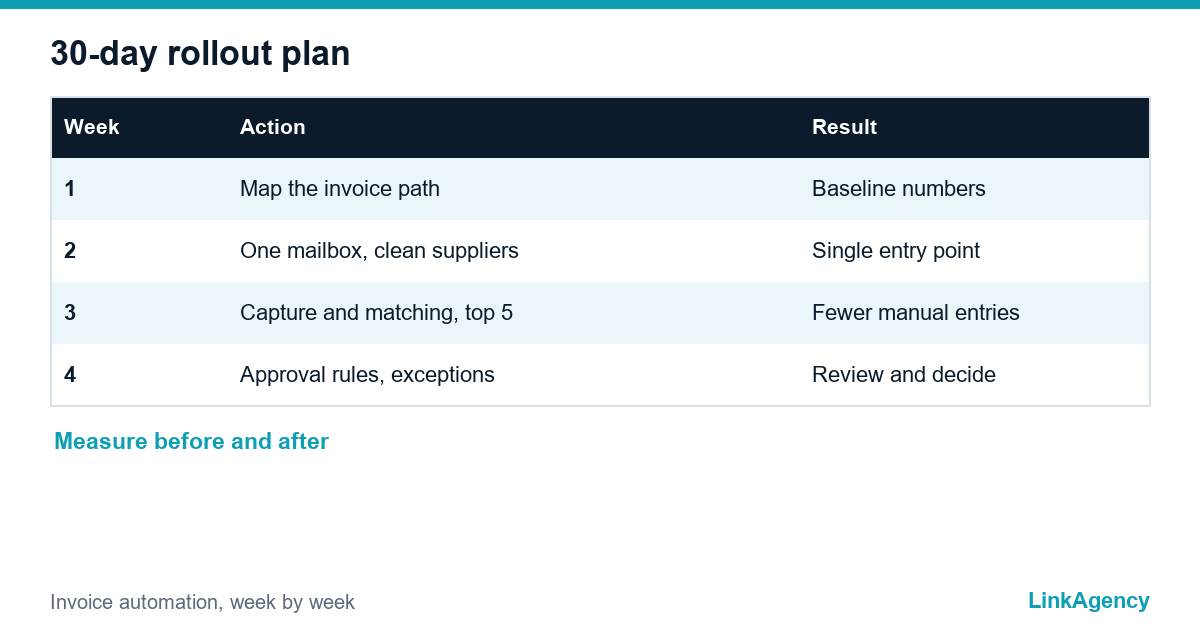
Start small. Week one: map the current path of a typical invoice and count the touches. Week two: route all invoices to one mailbox and clean the supplier list. Then switch on capture and matching for your five biggest suppliers. Add approval rules last and review the exceptions. This order mirrors the one in our guide to where to start with business process automation: pick one process, measure it, then widen. Expect friction in two places: staff who fear losing tasks and suppliers who must send invoices to a new address, so explain the gain to both early.
Automated invoice processing needs a baseline. Track four numbers before and after: minutes of work per invoice, share of invoices that need manual correction, days from receipt to payment, late fees paid and early-payment discounts captured. Without a starting measurement you cannot show that the project paid off, and invoice process automation then looks like a cost, not a gain.
Risks: Duplicates, Fraud and Personal Data
Automating invoice processing removes typing errors. It adds new risks too. Block duplicate payments by checking supplier, number, date and amount. Good invoice processing automation keeps a person in the loop for every exception. Treat a changed bank account as an exception that needs a call-back to a known number, because fake supplier emails are a common fraud. Keep invoices that contain personal data, such as sole traders’ names, under your GDPR retention rules, and keep an audit trail of who approved what.
Free Invoice Processing Automation Review From LinkAgency
Send us a description of how invoices move through your company today. We will show where time is lost, which deadlines apply to you, and what a first automation step would cost. If you prefer, you can order invoice automation services from us and have the first workflow running within weeks.
- map of your current invoice path and its bottlenecks;
- check of formats, approvals and data protection;
- a short plan with order of work and a budget range.
Leave a request and we will reply within one working day.

Frequently Asked Questions (FAQ)
Do small businesses in Europe have to accept e-invoices?
In Germany, all businesses must be able to receive e-invoices since 1 January 2025. France requires reception from 1 September 2026, and Belgium covers domestic B2B from 1 January 2026. Check your country’s official source and your tax adviser.
Is a PDF sent by email an e-invoice?
Usually not. A structured e-invoice follows a standard such as EN 16931, for example in XML. A plain PDF may still be accepted during a transition period, but the period differs by country.
How much time can automation save per invoice?
It depends on your starting point, so measure first. Count minutes per invoice, corrections and days to payment for a month, then compare after rollout.
Should we buy software or build our own?
Start with the accounting tool you already use and test its invoice features. Build custom only when your process is unusual, for example matching against a production or project system.
How do we avoid duplicate payments?
Check supplier, invoice number, date and amount on every invoice, and send any changed bank account to a person who calls the supplier on a known number.
Can LinkAgency review our invoice process?
Yes. We map how invoices move today, check formats, approvals and data protection, and send a short plan with a budget range. Leave a request and we reply within one working day.