A new lead arrives, a Zap creates a CRM card, and for months nobody thinks about it. Then an order goes missing. A field changes in one app. Three automations fail without a word. The real question is not which tool is better. It is whether this particular process still fits a no-code scenario or needs a custom integration. Below are seven warning signs, a way to handle the data question under GDPR, a one-day audit template and a migration plan that keeps live orders safe.
Zapier vs custom integration: why no-code is the right place to start
Zapier, Make and n8n connect thousands of apps without an engineer, which is exactly what you want while a process is still changing. A form creates a contact, a payment posts a message to chat, and the team tests an idea in an afternoon. If the workflow fits in one sentence, runs rarely and costs little when it fails, a custom-built integration is unnecessary work. Keep the no-code scenario and spend the budget elsewhere. A Zapier integration also lets you test a process cheaply, and if you are still choosing what to automate at all, read where to start with business process automation.

Seven signs a Zapier integration has become a bottleneck
- One scenario now has nested filters and branches that only its author can read.
- A failed run is found by a customer, not by an alert.
- Polling delays mean leads or orders wait minutes before anything happens.
- The monthly bill follows task volume, not business value.
- The workflow touches personal data or financial records.
- Two systems must stay in sync in both directions, with conflicts to resolve.
- A connector lacks a field or an action, and the workaround is a chain of webhooks.
One sign is an annoyance. Three together mean the process has outgrown the platform, and the choice is between a hybrid and moving it into code.
What a custom integration adds that a scenario cannot
A custom-built integration is code that talks to the APIs of your systems directly and lives in your repository. That gives you retries with a policy, structured logs, alerts that reach the right person, tests and versioning. Custom automation also removes the dependency on a vendor’s roadmap. If a connector is retired, your code keeps working, and a custom workflow can be tested like any other software. The price is engineering time and maintenance, so it pays off for processes that carry revenue or risk. Our custom software development services start from this question for every client. A custom API integration is also the only route when the source system exposes a capability that no connector covers. Zapier can start the process, yet the integration that moves payments is better treated as a custom piece of software.
Data, GDPR and the chain of processors
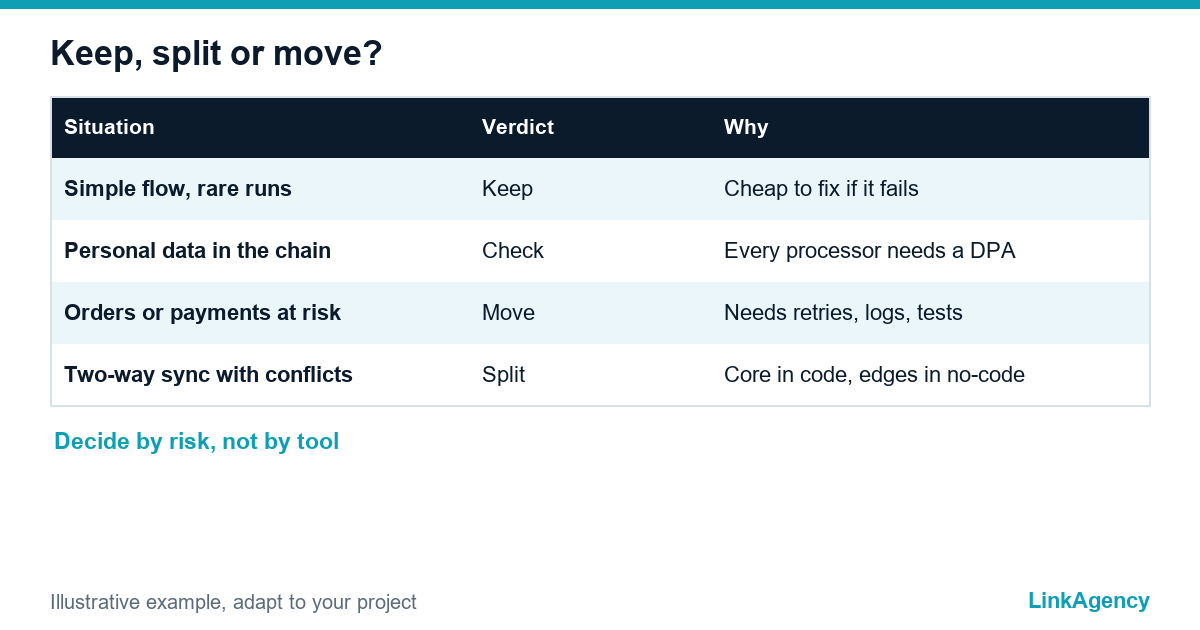
Every connected tool that handles personal data is a processor or a sub-processor of yours. In a Zap this means the automation platform plus every app it passes data to. Under GDPR you need to know where each of them processes data, sign a data processing agreement with each one, keep a record of the whole chain and be able to delete the data on request, which is hard to prove inside a scenario that nobody documents. The EDPB guidelines on controllers and processors explain the roles. If a scenario moves customer data through a third-party cloud that you cannot audit, that alone can justify moving it into your own infrastructure.
A hybrid setup: no-code at the edges, code in the core
Most teams do not choose one side. They keep no code tools such as Zapier or Make for notifications, simple syncs and experiments, and move the steps that need judgement, validation or audit into a small service that the scenario calls over a webhook. The scenario stays readable, the risky logic gets tests, and you can replace either half without touching the other. This is the safest first step when you are not sure that a full rebuild is justified. A self-hosted tool is another option, and the n8n licence terms show why you should read the licence before you rely on it commercially. Combining no-code with custom integrations also keeps each part small, and a hybrid setup is easier to hand over to a new team. Rebuilding the core as an integration built in code can then happen one scenario at a time.
A one-day audit template for no code tools and custom automation
List every active scenario and fill in four columns. Doing it in one day is realistic for most companies and shows where the real risk sits.
| Automation | Data it touches | If it fails | Decision |
|---|---|---|---|
| Form to CRM contact | Name and email | A lead is delayed | Keep in no-code |
| Order to ERP | Customer and payment data | A lost or duplicate order | Move to code |
| Invoice to accounting | Financial records | A wrong ledger entry | Move or hybrid |
| Chat alert for new sign-up | No personal data | A missed notification | Keep in no-code |
What to decide for each row
Sort by the third column first. Rows where failure costs money or trust come first. Our AI workflow automation team runs this audit as a short workshop.
Migration plan: how to move a live workflow without losing orders
- Document the current scenario: triggers, fields, filters and every system it touches.
- Build the new service and run it in parallel on test data.
- Run both versions on live traffic, with the new one writing to a staging copy only.
- Compare results for a full business cycle and fix every difference.
- Switch the trigger to the new service and keep the old scenario switched off, not deleted.
- Watch the logs and alerts for two weeks, then archive the old scenario.
Make every step idempotent, so a retry never creates a second order; the Stripe documentation on idempotent requests shows the pattern. Keep a rollback plan ready for the first week.
Free review of your current automations
Send us the list of your scenarios and we will mark which can stay in no-code, which need a custom integration and which are better as a hybrid. If you want to order a migration, our workflow automation services start with the same review, so scope and risks are clear before any work begins.
- an audit table for your scenarios;
- a decision on keep, split or move for each;
- a migration plan with rollback.
Leave a request and we reply within one business day.

Frequently Asked Questions (FAQ)
When is Zapier enough, and when do I need to build in code?
Zapier is enough for simple, low-risk flows that fit in one sentence and run rarely. Move to code when the process carries money or personal data, has branches only one person understands, or must be fast, auditable and in your control.
Can I use Zapier and custom code together?
Yes, and most teams do, as a hybrid setup. The scenario handles triggers and notifications, while a small service you own runs the validation, retries and logging, and the two talk over a webhook. You can replace either half without touching the other.
Is Zapier GDPR compliant for customer data?
The tool is one link in a chain. You still need to know where each connected app processes data, sign a data processing agreement with each processor and be able to delete records on request. If you cannot audit the chain, move that workflow.
How do I migrate a live workflow without losing orders?
Run the new service in parallel, compare results over a full business cycle, then switch the trigger and keep the old scenario switched off for a rollback. Make every step idempotent so a retry cannot create a duplicate order.
What should I audit first?
Start with scenarios that touch payments, orders, invoices or personal data, because failure there costs money or trust. Fill in what each one touches, what happens if it fails and what you decide, in one working day.
How can LinkAgency help with this choice?
We review your scenarios, mark what stays in no-code, what becomes a hybrid and what moves to code, and give you a migration plan with rollback. You get the written review before any development starts.