The contract is signed, the sale is closed, and then the chaos starts: an invoice, a questionnaire, documents, accesses and a first meeting move through emails, and every manager does it differently. Weeks pass before the real work begins, and the client already feels the disorder. This guide covers client onboarding automation, and onboarding for service businesses such as law and accounting firms, consulting, agencies, clinics and B2B services: a map of seven steps, what to automate at each one, where a person must stay, how to handle personal data under GDPR and how to start with a pilot in two to four weeks.
Why client onboarding automation pays off first: the most expensive manual stage
This stage falls between sales and delivery, so nobody owns it. Sales hands over a name and a deal, and the delivery team begins by asking again for what the client already said. Every missed email delays the start and costs billable time, which is why many teams decide to automate client onboarding. IBM’s overview of onboarding automation names the same building blocks: intake forms, documents and signatures, task setup, scheduling and payment, and analytics. It also advises to map the process before you automate it and to keep human touchpoints for complex or high-value clients. Our guide to lead follow-up automation covers the stage before the sale, and here we cover the stage after it.
Client onboarding automation map: seven steps from signature to the first meeting
- Contract and signature.
- Invoice and payment.
- Questionnaire about the client and the task.
- Collection of documents.
- Access to systems and accounts.
- An assigned owner on your side.
- A kickoff meeting with a clear agenda.
A client onboarding checklist for each type of client keeps the steps in order. Draw it on one sheet for your own business, with the real email, the real tool and the real person at each step. The gaps appear at once: a step with no owner, a step that waits for a reply, a step done twice. Then look at the client onboarding process for one client type, since onboarding for service businesses differs by profession, because law firms, clinics and agencies need different steps.
What to automate at each step and with which tools
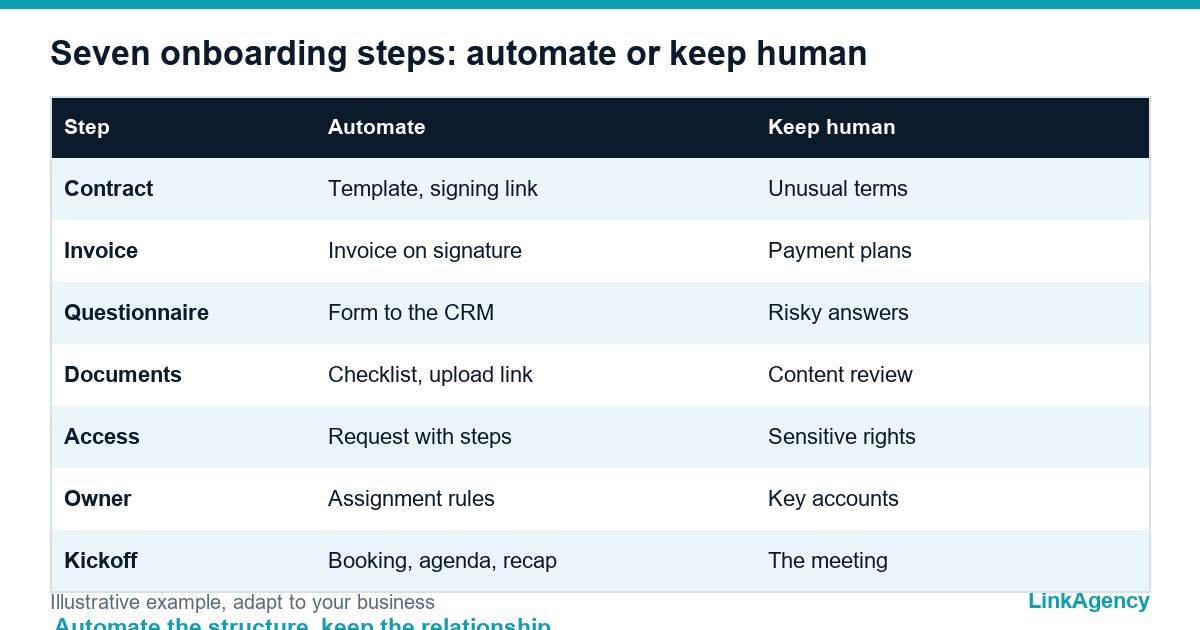
Most of this needs ordinary tools, not custom software: a CRM, a signature service, a form builder and a scheduler. The table shows a sensible split.
| Step | What to automate | What stays human |
|---|---|---|
| Contract and signature | Template, signing link, reminders | Negotiation of unusual terms |
| Invoice and payment | Invoice on signature, payment link, overdue reminder | Payment plans |
| Questionnaire | An intake form with conditional questions, saved to the client record | Reading answers that raise a risk |
| Documents | A checklist per client type, upload link, reminders | Review of the content |
| Access | An access request with steps for each system | Approval of sensitive rights |
| Owner | Rules that assign a manager and create tasks | Choice for key accounts |
| Kickoff | A booking link, agenda and a recap email | The meeting itself |
For an overview of tools by category, the comparison of client onboarding software from Leadsie groups them by contracts, forms, access requests and workflow automation. Our AI workflow automation connects these tools into one flow.

Where a human is needed: moments you must not hand to automation
Automate structure and keep the relationship. Clients rarely mind onboarding, but they never forgive chaos, and you cannot automate chaos. A person should handle the welcome call, a client who is silent, a risky answer in the questionnaire and any change to the scope. A rule that sends a message when a step is late, and alerts the owner when the client stalls, protects both sides. Without such escalation, you automate only the failures.
Documents and personal data: how to collect them under GDPR
What to ask in the questionnaire and what to skip
An intake form is a data collection, so apply the principles of the GDPR: collect only what you need for the task, which is data minimisation, and keep it no longer than necessary. In practice, ask for passports and contracts through a secure upload link with encrypted storage and not by email, give each document an owner and a retention date, restrict access to the team that works with the client and delete the data when the work ends. A short note in the form explains why you ask and where the data is kept.
How to measure the effect: time to start, errors, manager workload
Measure before you change anything, because time to start is the number clients feel first. Useful numbers are the time from signature to the kickoff meeting, the number of manual follow-ups per client, the share of forms completed on the first request and the time spent collecting documents. Compare them for the first ten clients before and after the change, and look at the number of questions managers repeat each week.
Where to start: a pilot on one client type in two to four weeks
Do not automate every email, since clients value onboarding that feels personal. Pick one type of client and one team, and automate client onboarding for them alone first. Use the client onboarding checklist as the acceptance test. First comes the map: draw it and agree the form and the checklist. Then connect the signature, the invoice and the reminders. After that add the questionnaire and the access request. In the final week, run real clients, collect feedback and fix the weak step. If it saves time and clients notice the order, extend it, and read our guide to business process automation for the next processes. For clients who need a portal after onboarding, read when a customer portal is worth building.
Free consultation: client onboarding automation for your business
Together we draw the map of your current onboarding and show which two or three steps to automate first. You can also order an onboarding consultation as a separate piece of work and receive a ready plan for the pilot.
- a map of your onboarding with the weak steps marked;
- a plan for a two to four week pilot.
Leave a request and we reply within one business day.

Frequently Asked Questions (FAQ)
How long should onboarding a new client take?
There is no single figure, because it depends on the service and the client. Measure the time from signature to the first meeting for your first ten clients, then set a target and shorten the slowest step first.
Which steps should never be fully automated?
The welcome call, decisions on unusual contract terms, risky answers in the questionnaire and any change of scope. Automate reminders and forms, and keep the relationship with a person.
Do we need special software to automate onboarding?
Usually not at the start. A CRM, an e-signature service, a form builder and a scheduler, connected by simple rules, cover most steps. Custom work makes sense when your process or data is unusual.
How do we keep client documents safe?
Apply data minimisation and use a secure upload link instead of email, give each document an owner and a retention date, limit access to the team on the case and delete the data when the work ends.
What if the client does not fill in the form?
Send a reminder after a day, alert the owner after a week and offer to complete the form during a short call. The flow should never wait silently.
Can LinkAgency map our onboarding?
Yes. We draw your current process, mark the weak steps and propose the two or three that are worth automating first. The first consultation is free.