Someone searches “plumber near me” on a phone and Google shows three businesses on a map. The rest of the city fights for the leftovers. Most owners lose it on small gaps: the wrong category, an old phone number, ten reviews nobody answered. This guide is a practical local SEO checklist, written for an owner who has one afternoon and wants a checklist for local SEO that shows what to fix first.
Local SEO Checklist: How Customers Find You and What Google Shows
Google builds local results from three signals. According to Google’s own tips for improving local ranking, they are relevance, distance and prominence. Relevance is how well your profile matches the search, distance is how far you are from the searcher, and prominence is how well known you are, which comes from reviews, links and mentions across the web. You cannot move your shop closer to the customer, so every checklist step works on relevance and prominence. That is also how to rank in Google Maps without tricks.
The map pack shows three businesses with ratings and buttons, and regular site results sit below it. A solid local SEO checklist therefore covers both the Google profile and the website behind it.

Google Business Profile Optimization: Categories, Services, Hours, Photos
Start where customers look first. Claim and verify the profile first, and then fill in every field that applies to your business, because empty fields are lost chances to match a search. Google Business Profile optimization is mostly about accuracy, not tricks, so use this Google Business Profile checklist.
- Primary category. Pick the one that describes your main income, such as “Dentist” rather than “Health”. Add two or three secondary categories at most.
- Business name. Use the real name on your sign. Keyword stuffing breaks Google’s guidelines and can get the listing suspended.
- Services and products. List each service with a short plain description and, where honest, a price or a “from” price.
- Opening hours. Add holiday hours, or a wrong “closed” label sends people to a competitor.
- Photos. Upload real photos of the storefront, the team and finished work.
- Service area. If you travel to customers, set the areas you actually cover and hide a home address.
Add a post or an offer once a month. Local fixes pile up fast, and a checklist keeps the SEO work short.
NAP Consistency: Same Details on Your Site, Maps and Directories
NAP stands for name, address and phone number. Search engines compare these details across your site, maps and citations in directories. When they disagree, trust drops. Build one master record and copy it everywhere, character for character, including “Street” versus “St.” and the same phone format.
Check these places in order: your website footer, Google Business Profile, Apple Maps, Bing Places, Facebook and two or three industry directories. Merge duplicate listings, because they split reviews and confuse maps and, after a move, every source changes in one day. Any local search checklist ends here.
Reviews: How to Collect Them Honestly and Reply
Google reviews and SEO are tied closely, and reviews are the loudest prominence signal you control. Ask every happy customer. Google’s guidance on getting more reviews allows a direct link to your review form, so use it.
- Create a short review link and put it in the receipt, the email and a printed card.
- Ask within a day of the visit, while the experience is fresh.
- Spread requests evenly, because fifty reviews in one week look unnatural.
- Reply to every review within two working days, with the service name and a concrete detail.
- Answer negative reviews calmly and offer to fix the problem offline.
Ask customers to mention what they bought, because a line such as “emergency boiler repair in Leeds” gives search engines far more to work with than “great service”.
Location and Service Pages on Your Website
The site backs up the profile. Give every real location its own page, and every core service its own page. Each page needs a unique title with the service and the city, the NAP block, an embedded map, photos and two or three real reviews. Never clone one page and swap the city name.
Add LocalBusiness structured data so search engines read your address, hours and phone as data. Google’s local business structured data guide lists the required fields. Local SEO for small business also depends on speed and mobile layout. Most local searches happen on a phone. If the site is slow or outdated, a web development team can rebuild the pages that carry the calls.
Local SEO for service businesses without a storefront
Plumbers and cleaners have no shop to visit, so pages carry more weight. Describe areas by district, show real jobs and keep the service area consistent with the profile. Local SEO for service businesses works best when each district page answers a real question, such as response time or typical price.
Local SEO for Multi-Location Businesses
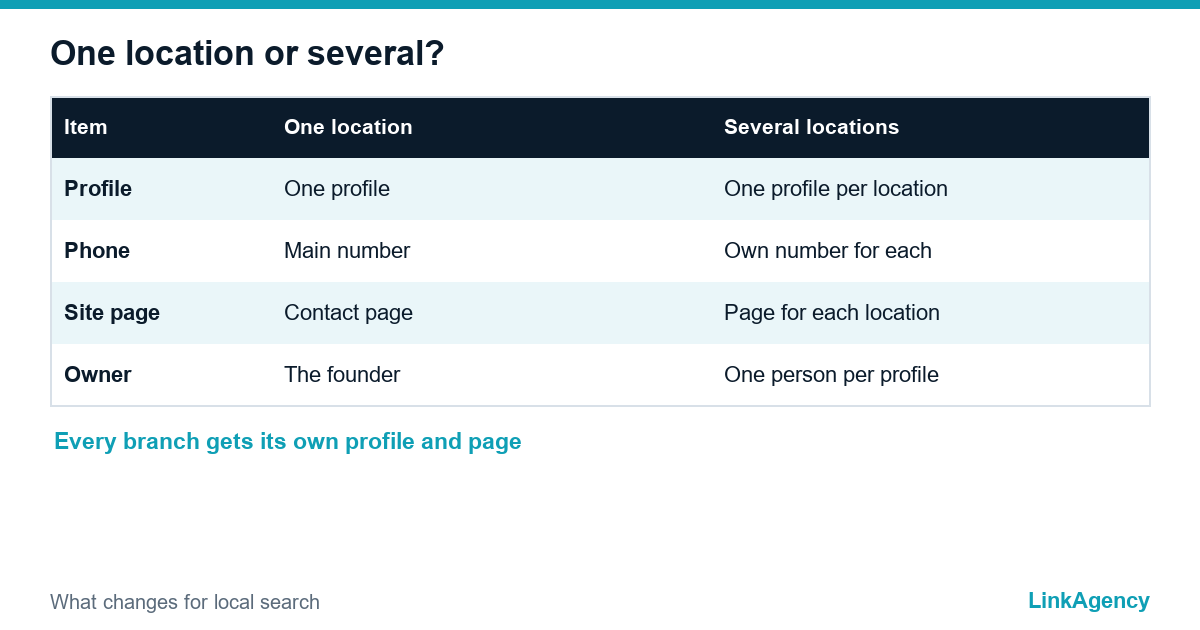
With several branches, each location needs its own profile, page and phone number. Keep names consistent and give each profile one owner, because every local branch repeats the checklist and the SEO routine stays the same. A shared sheet with the master NAP, category and profile link for each branch prevents most mistakes.
| Step | What to do | How often |
|---|---|---|
| Profile | Check category, hours, services, photos | Monthly |
| NAP | Compare site, maps and directories | Quarterly |
| Reviews | Request, reply, flag fake ones | Weekly |
| Site pages | Update location and service pages | Quarterly |
| Results | Review calls, directions, leads | Monthly |
How to Measure Local SEO: Calls, Directions, Leads
Rankings on the local map pack move with the viewer’s position, so one “position 1” screenshot proves little. Track outcomes instead: the profile reports calls, direction requests and website clicks. Tag the profile link with UTM parameters, check queries in Search Console and compare the same month year over year. For the wider set of numbers, see our guide to the six metrics to measure SEO success.
Run this local SEO audit checklist every month, and change one thing at a time so that you can tell which change moved the numbers. If calls rise but leads do not, fix call handling or the landing page, not the ranking.
Get a Free Local SEO Audit From LinkAgency
We check your Google profile, NAP data, reviews and location pages against this local SEO checklist and send fixes in priority order. If you prefer to order local SEO as a service, ask about our local SEO services for one location or a network.
- categories, services and photos against local competitors;
- NAP comparison across site, maps and directories;
- plan for reviews and location pages for 90 days.
Send a request and we will reply within one working day with a clear plan and price.

Frequently Asked Questions (FAQ)
How long does local SEO take to work?
Profile fixes can change visibility in a few weeks. Reviews and location pages usually need two to four months, and big cities take longer.
Do I need a website if I have a Google profile?
Yes. The profile earns the first click, but the site proves expertise, hosts location pages and lets you measure leads and calls.
How many reviews do I need to rank in the map pack?
There is no magic number. Compare yourself with the three businesses already shown for your service and match their rating and the pace of new reviews.
Can I change my business name to include a keyword?
Only if it is your real name used on signs and documents. Adding a service or a city to the name violates Google’s guidelines and can get the profile suspended.
What should I do about a fake or unfair review?
Reply politely, then flag the review if it breaks Google policy. Never offer money to the reviewer or threaten them.
Can LinkAgency run local SEO for my business?
Yes. We audit the profile, clean up the data, build location pages and set up tracking for calls and leads. Send a request and we reply within one working day.