You translated the site into German, French and Spanish, switched the language versions on, and a quarter later the new countries bring almost no enquiries. Google shows the wrong version, some pages never reach the index, others compete with each other. The mistakes below hit a multilingual rollout hardest, and SEO is the first thing to suffer. In practice SEO for multilingual websites rarely fails on translation quality. It fails on setup. Here are seven of them from a business point of view, each with a ten-minute check and a note on when to call a specialist.
Multilingual SEO is not translation: what buyers in Germany, France and Poland search for
Multilingual SEO makes each language version findable in its own market, not just readable in its language. A German buyer of project software and a Polish one use different terms, a different level of formality and different comparison points. Google’s guidance on managing multi-regional and multilingual sites starts from the same idea: a page is built for a specific audience, and language is only one signal.
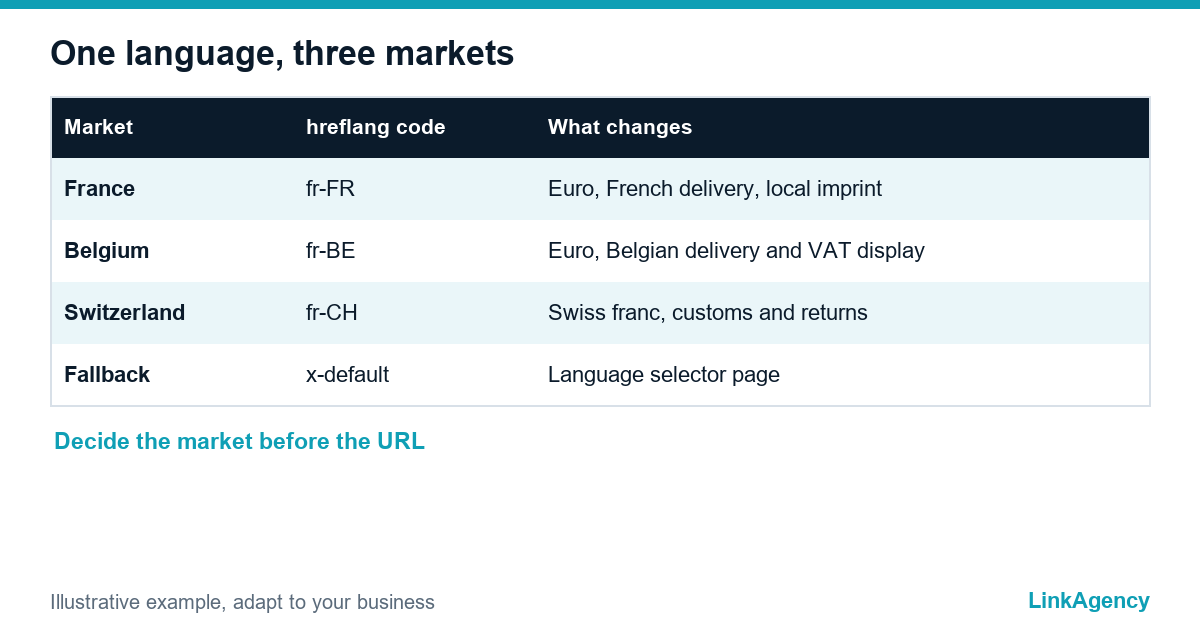
A workable international SEO strategy starts with three decisions per country: language, currency with delivery area, and whether one language version can serve several countries. French for France, Belgium and Switzerland is the typical trap, because a single page rarely ranks well in all three.

Mistakes 1 and 2: machine translation without editing and one keyword list for every country
The first mistake is publishing raw machine translation. It reads fine at a glance and fails on product names, legal wording and the way a local buyer phrases a request. The second is running keyword research once in English and translating the list: a service called one thing in Berlin is called another in Warsaw, and the volumes differ too.
A ten-minute check
- Search the main phrase of the German page on Google.de. Does anyone actually use it?
- Compare the top three results with your page: same format, same terms, same price display?
- Ask a native speaker to read only the headings and the call to action.
If two checks fail, the page needs a rewrite for that market by an editor who knows the niche, not a plugin.
Mistake 3: site structure, subfolders, subdomains or country domains
All three structures can rank, and Google has said so for years. The question for multilingual website SEO is which one your team will still maintain in two years. A country-code domain (ccTLD) looks convincing but means separate hosting, hreflang and content work for every market. A subfolder structure that is kept up to date will outperform a ccTLD that goes stale. Our web development services team builds the language structure into the site before the first translation arrives, because moving it later is the expensive fix.
| Structure | Strength | Weak point | Fits |
|---|---|---|---|
| Subfolders (/de/, /fr/) | One domain, shared authority, simple hreflang | Weaker country signal | Most small and mid-size businesses |
| Subdomains (de.example.com) | Clean technical separation | Treated more like a separate site | Separate regional teams |
| Country domains (.de, .fr) | Strongest local trust signal | Cost and fragmented authority | Large brands with a budget per market |
Mistakes 4 and 5: hreflang without return links and automatic redirects by IP
Hreflang is where most European rollouts break. Multilingual SEO depends on it more than on any translation, because Europe packs more language and country combinations into a small area than almost anywhere else. Google’s page on localized versions of a page sets the rules: every version points to every other version and to itself, codes follow the standard, and x-default marks the fallback.
Typical hreflang mistakes
- The French page links to the Belgian one, but the Belgian page does not link back.
- A wrong code, such as en-UK instead of en-GB.
- Tags only on the home page and nowhere else.
- A canonical tag that points to another language version.
The fifth mistake is the automatic redirect by visitor location. Googlebot crawls mostly from US addresses, so if every visit is sent to one version, the others may never be seen. A banner that offers the local version and lets the visitor choose is safer, and our technical SEO services include a check of exactly these redirects.
Mistake 6: legal pages, currency, delivery and payment not adapted to the country
SEO on a multilingual site includes the local layer. A page in perfect German with prices in pounds, an English privacy policy and a delivery table for another country does not convert. Website localization goes beyond words: check the currency and VAT display, the imprint and legal pages required locally, delivery and returns terms, and the payment methods used there. Test the cookie banner under GDPR too, because a consent script that delays rendering can leave Google with an empty page.
Mistake 7: one Google Business Profile and one set of reviews for every market
A single profile for all countries tells local buyers nothing. Where you have a physical presence, give it its own profile, address and reviews in the local language, starting from our local SEO checklist for Google Business Profile. Where you only deliver, work on local mentions and reviews on the platforms that market trusts. This is where SEO in several languages is won or lost.
A launch checklist for a new language version
Multilingual SEO launches fail on skipped steps, so these mistakes are avoided by running one list for every new language.
- Choose the market and write down language, currency and delivery area.
- Run keyword research in the local language and map it to pages.
- Have a native speaker edit the translation, including titles and descriptions.
- Set the URL structure, hreflang with x-default and the sitemap.
- Adapt legal pages, prices and payment methods.
- Check indexing in Search Console for four weeks.
Free audit of your multilingual website
Send us your site and the target countries. We check hreflang, indexing of each language version and how every page matches the queries in its market, then show what to fix first. Our multilingual SEO services start with that audit, and you can order a multilingual website audit as a separate project.
- a list of hreflang, canonical and redirect errors;
- a priority list for each market.
Leave a request and we reply within one business day.

Frequently Asked Questions (FAQ)
Do I need hreflang if my site has only two languages?
Yes. Even two versions benefit, because hreflang tells Google which page belongs to which audience and reduces the risk of near-duplicate pages competing with each other. Add return links and a self-reference on every page.
Which URL structure is best for European markets?
Subfolders suit most small and mid-size businesses, because they share authority and are simple to maintain. Country domains make sense only when you can support separate hosting, content and hreflang for each market.
Is automatic translation acceptable for SEO?
As a first draft, yes (machine translation can save time). Published without editing it tends to miss local terms, legal wording and search intent. Have a native speaker edit titles, headings and calls to action before the page goes live.
Should I redirect visitors to the version for their country?
Not automatically. A redirect by IP can stop Googlebot from reaching other versions and annoys travelling buyers. Show a banner that suggests the local version and lets the visitor choose.
How long until a new language version shows results?
Indexing usually takes days to weeks, and rankings and enquiries often follow over several months, depending on competition and on how established the domain is. Check Search Console weekly for indexing problems.
Can LinkAgency audit our multilingual site?
Yes. We check hreflang, indexing, structure and page-to-query match for each language and give you a written list of fixes in priority order before any work is agreed.