Ads bring visitors, search sends more, and yet the enquiries do not grow. Why is the website slow, then, when the design is new? When owners ask why is my website slow, each contractor names a different culprit. This guide puts the causes in business language, shows three numbers worth tracking and gives the order of work from cheap to costly.
Why is my website slow: what it does to leads and ad spend
A slow page wastes money before anyone reads it. You pay for the click, the visitor waits, and some leave before the page appears. Google also treats page experience as part of search, as its page experience guidance explains, so a slow website hurts both paid and organic traffic. Good design does not help if the page opens late. If your site looks fine but brings no enquiries, see how to fix conversion on a good-looking site.

Three metrics a manager should watch
Ask for three numbers. Measure them on real visitors, not only in a lab test, because a lab test shows one device on one connection while customers use thousands of combinations. Google’s Core Web Vitals give a clear scale, and a good result means the 75th percentile of visits stays within the limits.
| Metric | What it shows | Good result |
|---|---|---|
| LCP | When the main content appears | 2.5 seconds or less |
| INP | How fast the page reacts to a tap or click | 200 milliseconds or less |
| CLS | Whether the layout jumps while loading | 0.1 or less |
Check the website loading speed on mobile first, because most business sites lose more visitors there. The page often looks fine on the office computer. That is why owners miss the problem for months.
How to test your website speed: tools and what to read
Use free tools. PageSpeed Insights shows a lab test and, where available, field data from real Chrome users. Lighthouse in Chrome DevTools gives the same lab view with a list of opportunities. Test the pages that bring money: the home page, a service page and a landing page, using mobile settings. Run each test several times and take the middle result, because one run can be skewed by a busy server. Save the numbers with the date, so you can show the effect of every change and the website loading speed before and after.
Why is my website slow: images, plugins, scripts and hosting
Why does a website feel slow even when the hosting bill is high? Four causes explain most cases. Heavy images come first: photos uploaded straight from a camera, and every image also needs alt text, one of the website accessibility requirements. Next are plugins and add-ons that each load their own code, often on every page. Third come scripts from outside services, which is where a site slows down after a marketing change. The fourth is cheap shared hosting that answers slowly under load, which is costly in a peak week, so a Black Friday checklist starts with a load test. A theme full of unused features adds weight on top. Many owners ask why my website is slow only on phones; the answer is usually the same pile of code, which a weaker phone processes more slowly than an office computer.
Why does a website that passed a test last year feel slow today? New plugins and tags accumulate quietly.
- images: compress them and serve modern formats;
- plugins: remove what no one uses;
- scripts: load them only where needed;
- hosting: compare response time before paying more.
Trackers, chats and cookie banners: when marketing slows the site
Every tracking tag, chat widget and consent banner is code the browser must download. Ten small tags can cost more than one large image, so tracking tags deserve a yearly review. Keep only what the team reads weekly, load chat after the first interaction and make sure the banner does not push the layout down. Do this together with whoever runs SEO, so that no tag needed for measurement disappears by accident.
Caching, CDN and database in plain words
Caching stores a ready page, so the server does not rebuild it for every visitor. A content delivery network keeps copies of images and files closer to the visitor, which helps when customers are far from your server. A database that has grown for years with old revisions and unused data answers more slowly, and on WordPress a clean-up and a good object cache often help. These are developer tasks, but a manager should know to ask for them by name.
Quick fixes and fixes that need development
Some changes take a day: compress images, remove unused plugins, switch on caching and trim tags. Others need a developer: a lighter theme, cleaner code, a better database or a new server setup. Website speed optimization of the quick kind often brings a visible gain, and it is how to speed up website pages without touching the design. Deeper work needs web development services with a clear scope, and it helps to improve website speed in stages, so each step is measured. Start cheap. Measure after each step.

When optimization is not enough and the platform must change
Why is my site slow after every update? That question is a warning sign. Consider a change when fixes give little, the theme or builder blocks basic edits, or every update breaks something. At that point a redesign on a lighter base costs less than yearly patching. Read when to redesign your website before you decide, and protect your rankings during the move.
Questions for a contractor and a 30-day plan
Before you sign anything, ask the plain question: why is my website slow, and which fix will change the numbers first? A good answer names a metric, a cause and an effort.
Ask the contractor
- Which metric will improve, and by how much?
- What will you change first and why?
- How will we see the result on real visitors?
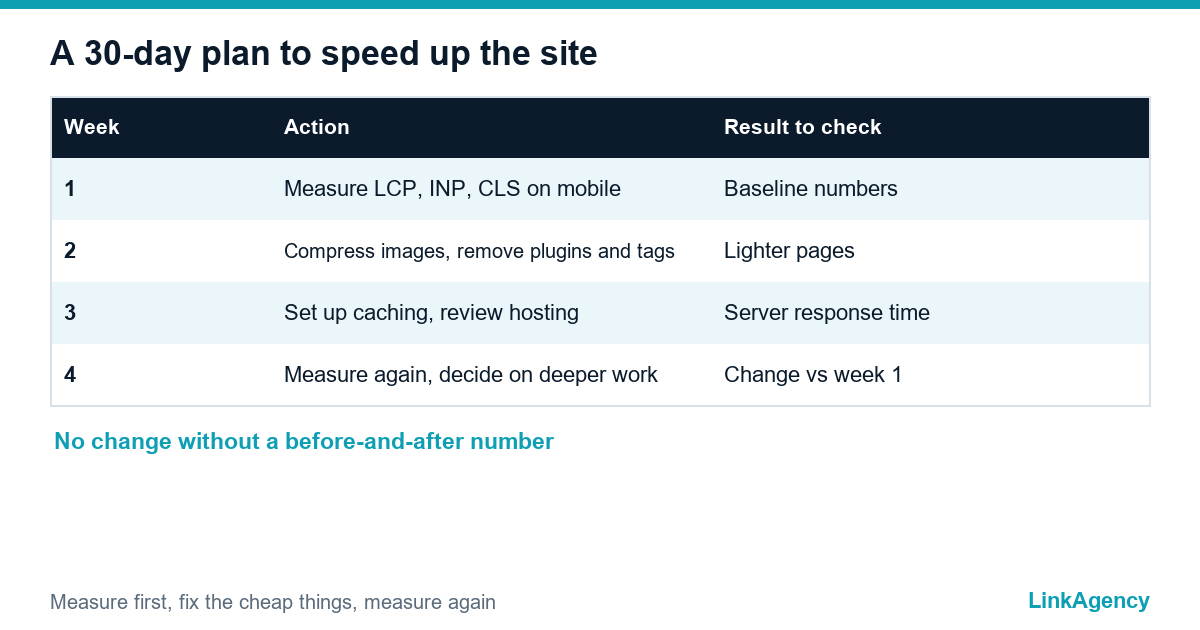
A 30-day plan
- Week 1: measure LCP, INP and CLS on mobile.
- Week 2: compress images, remove plugins and tags.
- Week 3: set up caching and review hosting.
- Week 4: measure again and decide on deeper work.
Order a website speed audit from LinkAgency
We answer the question why is my website slow with numbers and a ranked list of causes, so you know what to fix first and what it costs. Cheap fixes come first, and we say so when the platform is the problem.
- measurement of the three metrics on real visitors;
- a review of images, plugins, scripts and hosting;
- a plan for 30 days with effort for each step.
Send a request and we reply within one working day. We offer website speed optimization services for CMS and builder sites.

Frequently Asked Questions (FAQ)
Why is my website loading slow only on phones?
Phones have weaker processors and slower connections, so heavy code hurts there first. Open the page on a phone and run the free tests from Google. Look at LCP, INP and CLS, and compare the lab result with data from real visitors.
Does a slow website lower search rankings?
Speed is one of several page experience signals. A slow page rarely sinks a strong result alone, but it loses visitors and weakens every campaign that sends traffic.
Which fix gives the quickest gain?
Compressing large images and removing unused plugins and tags is the fastest way to improve website speed. Both take about a day and often change the numbers on mobile.
Is faster hosting always the answer?
No. Compare server response time first. If the delay comes from heavy code or scripts, a better server only hides the problem for a while.
How much does it cost to speed up a website?
It depends on the platform and the causes. A basic clean-up takes days, while rebuilding a theme or moving to a lighter platform is a larger project. An audit gives a fixed scope.
Can LinkAgency speed up my website?
Yes. We measure, rank the causes and fix them on WordPress, builders and custom sites. Send a request and we reply within one working day. Our website speed optimization services start with an audit.