Your sales team keeps deals in spreadsheets, important data sits in “other” fields, and licences and add-ons multiply every quarter. A ready-made CRM does not follow the real sales and service process, and a custom CRM costs you build time before it saves anything. The question of custom CRM vs off the shelf comes up when building your own sounds frightening: timelines, support, dependence on a contractor. This guide treats the choice as three paths, not two, with signs that you have outgrown your system, a cost logic without invented prices, a data and GDPR section and a ten-question test for the executive.
Custom CRM vs off the shelf: three paths instead of two
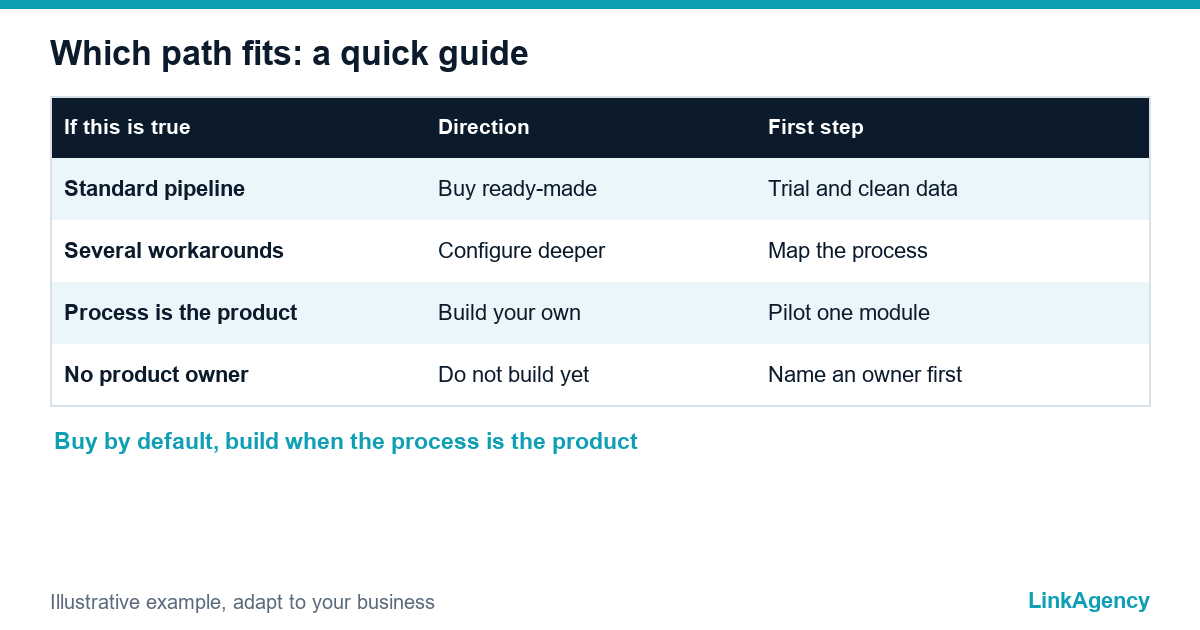
Most articles set custom CRM or off-the-shelf as a duel. In practice there are three paths, and off-the-shelf CRM vs custom is only the two extremes. Path one is a ready-made CRM used as it is: fast, supported by the vendor, shaped by the vendor’s model. The second is deep configuration and extension of a ready-made platform: custom fields, objects, automations and integrations on top of it. Last comes your own web application, the truly custom path, built around your process. Each wins in a different situation, and the second path is often the missing middle that avoids both a cramped tool and a long build.
Seven signs you have outgrown your CRM
- The same record is entered twice, in the CRM and in a spreadsheet.
- Reports are rebuilt outside the CRM before every management meeting.
- Approvals and special prices run through email or chat.
- Operations keep a separate database because the CRM stops being useful after the sale.
- Add-ons fill gaps and licences grow faster than the team.
- Only one person understands how the system really works.
- A new product or service line needs a workaround from day one.
One workaround is harmless. Several connected ones turn into an operating model, and that is the moment to ask whether to configure further or to build. This helps: business process automation guides help you map the process before you decide.

When building your own is justified: the process is the competitive edge
Build when the way you sell or serve is itself what customers buy. Examples are unusual quoting and approvals, entities that standard CRMs do not model (sites, contracts, installations), several business units with different rules, or tight links to stock and production. Weigh custom CRM vs off the shelf with a plain test: if your process can be described in a standard pipeline with stages and tasks, buy. If it needs its own data model, a web application development project can give you a system shaped around it.
When not to build, even if you really want to
- The process is standard and the team is small.
- Nobody can own the product after launch and decide what changes.
- You need advanced marketing automation from day one.
- You expect the custom system to be finished: it never is, it needs a maintenance budget.
Between the two sits the option of keeping the ready-made CRM and building only the missing piece, such as an integration, a report or an approval flow. Our guide to Zapier vs custom integration covers where the line falls.
Costs over three years: what they consist of, without illusions
| Cost item | Ready-made CRM | Deep configuration | Own application |
|---|---|---|---|
| Licences | Per user, grows with the team | Per user, often higher plans | None, but hosting |
| Setup or build | Low, weeks | Medium, months | Highest, months |
| Integrations | Standard connectors, extras paid | Custom connectors | Built to your systems |
| Support and updates | Vendor | Vendor and partner | Your team or contractor |
| Development after launch | Limited by plan | By partner hours | By your backlog |
What to ask every supplier
Ask each one for the same breakdown. Compare the full three-year picture, including the hidden items: training, data clean-up, the owner’s time and what happens if the contractor leaves. This is the build or buy a CRM question in numbers, and it is easier to answer once licences, hosting and support sit in one table.
Data, access and GDPR: who owns the system and the customer data
Ask for export in a usable format, a data processing agreement, a list of sub-processors and clear rules for access logs and deletion. A system you own gives you control, and it also gives you the duties of a controller and security owner. A custom CRM versus a ready-made one differs here most. Under GDPR the vendor of a ready-made CRM is a processor under the regulation’s rules on processors, and the EU Data Act adds switching rules for data processing services, so ask a lawyer how both apply to your case.
A ten-question test before you decide
- Can our process be drawn as a standard pipeline?
- Which three steps need data a CRM does not hold?
- How many workarounds exist today?
- Who would own the product after launch?
- What happens to sales if the system is down for a day?
- Which integrations are essential in year one?
- Can we export every record today?
- What do licences cost at twice the team size?
- Is there a smaller step, such as one integration, that solves most of the pain?
- What would we stop doing if we did not build?
Free consultation: custom CRM or a ready-made one
Tell us about your sales and service process and we will say honestly, for custom CRM vs off the shelf, whether configuring a ready-made CRM is enough or you need your own system. Whatever the answer, we explain it in writing. If you decide to build, we offer custom CRM development, or you can order a CRM audit as a separate project.
- a process map with the points where the CRM fails;
- a recommendation across the three paths.
Leave a request and we reply within one business day.

Frequently Asked Questions (FAQ)
Should we build our own CRM?
Only if your process is part of what customers buy and cannot be modelled in a ready-made CRM even after deep configuration. For a standard pipeline with stages and tasks, buying is usually the better choice.
What is the middle option between buying and building?
Deep configuration of a ready-made platform, or keeping it and building only the missing piece, such as an integration, a report or an approval flow. This often removes most of the pain.
How do I know we have outgrown our CRM?
Look for double entry, reports rebuilt outside the system, approvals by email, a separate database after the sale and licences growing faster than the team. Several of these together are a clear signal.
Who owns the data in a ready-made CRM?
You remain responsible for your customer data, and the vendor acts as a processor. Check export formats, the data processing agreement, sub-processors and deletion rules before you sign.
What does a custom CRM cost over three years?
The answer depends on scope, so compare the structure: build, hosting, support and every new feature against licences per user, integrations and partner hours. Ask each supplier for the same three-year breakdown.
Can LinkAgency review our process before we choose?
Yes. We map your sales and service process, show where the current CRM fails and recommend one of the three paths in writing, before any work is agreed.