A customer writes at 11 p.m. to ask where an order is, gets no answer until morning and buys from a competitor next time, a loss that lead follow-up automation closes for sales enquiries. An AI chatbot for customer service could have replied in seconds, or it could have invented a delivery date and made things worse. Whether AI chatbots for customer service pay off depends less on the tool and more on which questions you give them. This guide to AI customer service shows how to decide, with a pilot you can stop if the numbers do not work.
AI Chatbot for Customer Service: Which Requests to Trust to a Bot
A bot is strong on questions that repeat and have one correct answer: opening hours, delivery status, return rules, price lists, booking changes. It is weak where the answer needs judgement, money or empathy, such as a faulty product, a refund dispute, a legal question or a customer who is already angry. Draw the line by risk, not by volume, because a frequent question with a risky answer still belongs to a person.
A simple test helps. If a new employee could answer from a one-page document on day one, an AI customer service chatbot usually can too. If the answer needs a manager’s decision, it cannot. A chatbot gives fast service only when the AI behind it reads checked sources.

Review 30 Days of Incoming Questions Before Buying Anything
Do not start with a vendor demo. Export the last 30 days of emails, chats and call notes, sort them by type, count each type and note which were answered from a standard text. This takes half a day and shows whether you have a bot problem at all. Small shops often find that most tickets are one question, such as order status. That is where AI customer support for small business starts, and a status page or an online store integration may solve it without AI.
| Request type | Example | Who should handle it |
|---|---|---|
| Fixed facts | Hours, address, delivery terms | Bot |
| Account or order lookup | Where is my order? | Bot with system access |
| Guided choice | Which plan fits me? | Bot, then a person |
| Complaint or refund | Faulty product, disputed charge | Person |
| Sensitive or regulated | Health, legal, financial advice | Person |
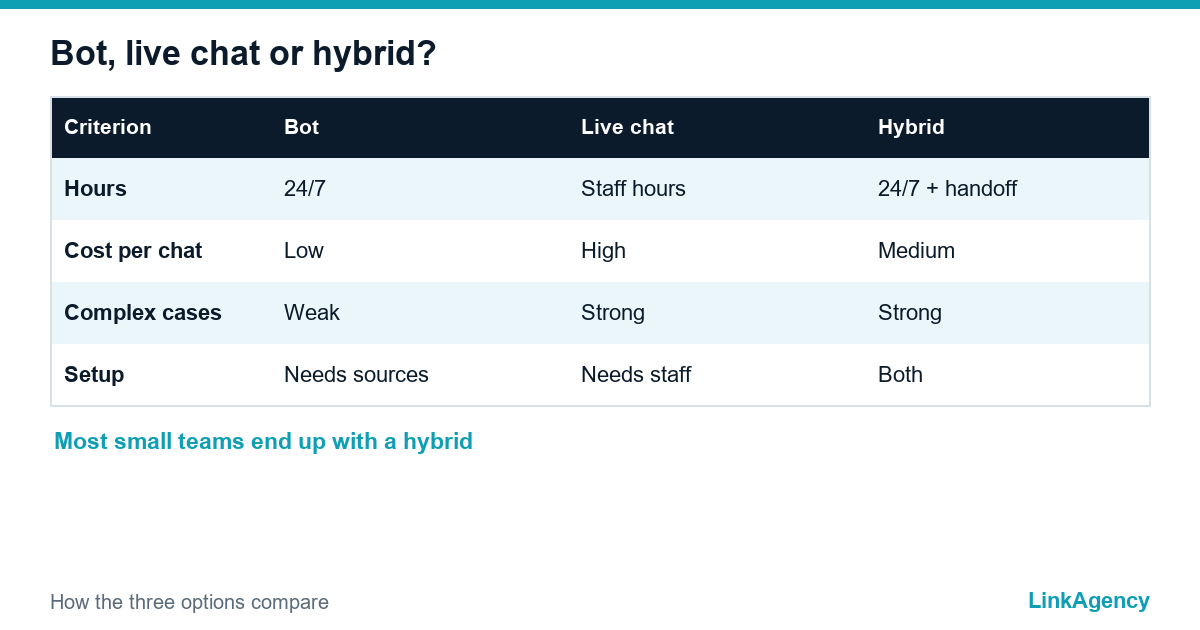
Chatbot vs Live Chat: Bot, Human or Hybrid
The real choice in the chatbot vs live chat debate is rarely either-or. Live chat gives the best quality but costs staff hours and cannot cover nights, while a bot covers every hour at a low cost per conversation but fails on the unexpected, which is why an AI chatbot for business needs a person behind it. Most small businesses end up with a hybrid: the bot answers routine questions, collects the order number and passes the rest to a person with the history attached. Customers accept this when a human is one step away, which matches Nielsen Norman Group’s research on chatbot usability.
When to use a chatbot comes down to three facts: you get repeat questions, you have a clean source of answers and someone owns the quality. If one is missing, fix it first.
Knowledge Sources and Guardrails Against Wrong Answers
An AI chatbot for customer support is only as reliable as the documents behind it, and the same holds when software reads invoices in invoice processing automation. Give it a short list of approved sources, such as the help centre, price list and returns policy, and keep them current, because a bot quoting last year’s prices is worse than no bot. Good setups retrieve the answer from this knowledge base and quote it instead of improvising.
- Answer only from approved sources, and say “I don’t know” otherwise.
- Block topics you never automate, such as large refunds or legal claims, and let a customer service chatbot say it cannot help.
- Connect prices, stock and delivery dates to live systems.
- Log every conversation so a person can review a sample each week.
Handoff to a human and quality control
The handoff decides whether customers forgive the bot. Put a “talk to a person” button in every message, escalate automatically after two failed answers or when the customer sounds frustrated, and pass on the whole conversation. Write the escalation rules down. Outside working hours, promise a time for the reply and keep it.
During the pilot, review twenty conversations a week and tag each as correct, partly correct, wrong or escalated. Judge the share of wrong answers more strictly than the share of resolved chats, because one confident mistake costs more than ten unanswered questions.
GDPR, AI Disclosure and Data Security for an AI Chatbot
For an AI chatbot for customer service used by customers in the EU or UK, AI chatbot GDPR compliance starts with basics: tell people what data you collect and why, collect no more than you need, and sign a data processing agreement with the vendor. The General Data Protection Regulation also lets people ask for access and deletion, so check that your logs can be searched and erased.
Say clearly that the customer is talking to an AI. The EU AI Act sets transparency duties for such systems, and application dates are still being adjusted, so confirm the timetable before launch. Keep card numbers, health details and other personal data out of the chat, and ask vendors where data is stored and whether your conversations train their models. Our AI readiness checklist for data, process and risk covers these questions in more detail.
A 4–6 Week Pilot: Success and Stop Criteria
Run the first AI chatbot for customer service on one channel and three or four request types, and set the numbers before you start.
- Week 1: connect the approved sources and test fifty real questions internally.
- Weeks 2 to 3: open the bot to a share of visitors with the handoff button visible.
- Weeks 4 to 5: review weekly, fix gaps in the documents and add one request type.
- Week 6: compare results with the targets and decide to scale, adjust or stop.
A customer service chatbot earns its place only if it meets the targets. Good targets are a resolution rate for the chosen requests, a ceiling for wrong answers, stable customer satisfaction and a faster first response. Stop if wrong answers stay above the ceiling after two rounds of fixes, as a customer service chatbot with unsafe answers costs more than it saves. If you want help sizing the project, our AI consulting team can review your data and risks first.
Get a Free Support Chatbot Audit From LinkAgency
We review your last 30 days of questions, show which ones suit an AI chatbot for customer service and which should stay with people, and outline a pilot with stop criteria. If you decide to build, our AI chatbot development team can order the setup, connect your documents and add the handoff.
- sorting of requests into bot, hybrid and human;
- list of sources, guardrails and GDPR points;
- pilot plan for four to six weeks.
Send a request and we will reply within one working day.

Frequently Asked Questions (FAQ)
How much does an AI support chatbot cost?
Platforms usually charge a monthly fee plus a price per resolved conversation, and a custom build adds setup work. Ask for the full price at your expected volume, including the work of keeping documents current.
Will a chatbot replace my support team?
Rarely. It removes repeat questions, so people spend time on complex cases and complaints. Plan for a change in their work, not for a smaller team.
How do I stop the bot from giving wrong answers?
Restrict it to approved documents, connect live data for prices and orders, and let it say it does not know. Review a sample of conversations every week.
Do I have to tell customers they are talking to an AI?
In the EU the AI Act sets transparency rules for such systems, and honesty also builds trust. State it in the first message and confirm the current application dates.
Which metrics show that the pilot works?
Resolution rate for chosen request types, share of wrong answers, first response time and customer satisfaction. Set targets and stop criteria before the pilot starts.
Can LinkAgency build and run a support chatbot?
Yes. We audit your requests, connect approved sources, add the handoff and set up review reports. Send a request and we reply within one working day.