From 12 October 2026 Google says its system may read your website, spot coupons and deals, and show them under your ads. If an old banner still says 30% off, that offer can reach customers while your team is busy with something else. Here is a clear rule for a marketing lead: who gains, who should switch the feature off, and what to check on the site first.
What Google Ads automated promotions change from 12 October
The system now builds the promotion text itself, with nobody typing a headline. Google’s help page on automated promotions says it applies to Search and Performance Max campaigns that have location assets attached and no manual promotions running. Each offer serves for less than 24 hours, then returns only if the system still sees it on your page.
That narrows the audience. An online-only shop with no store locations linked may notice nothing, while a retailer with stores is the target.
How automated promotions in Google Ads work and where to find them
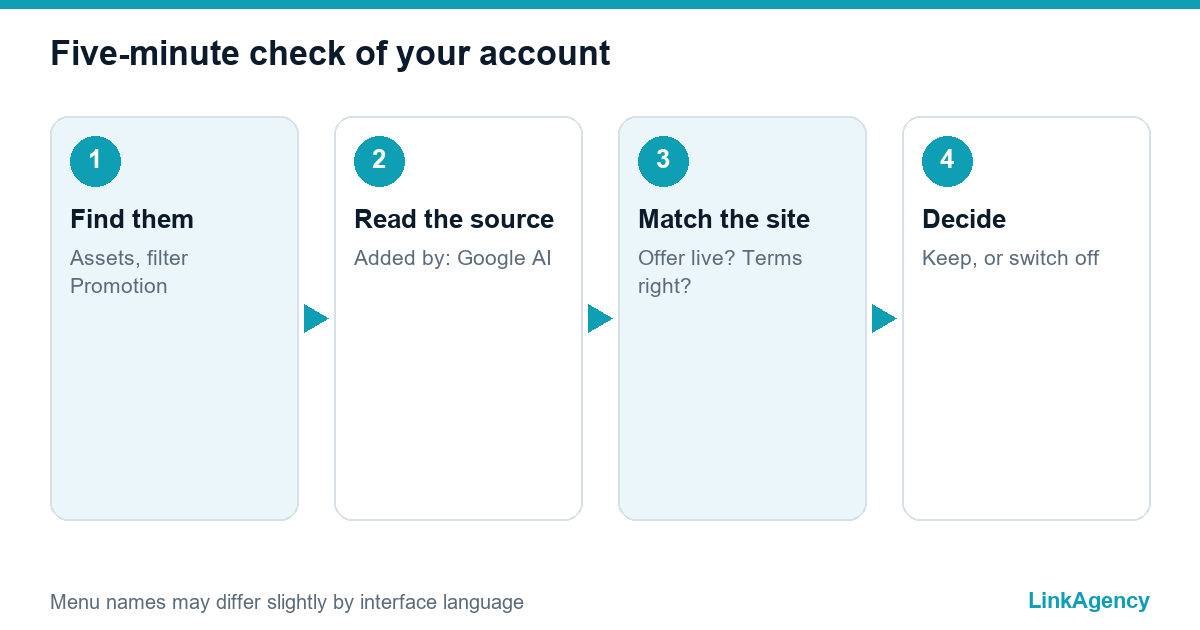
Automated promotions in Google Ads start with a scan of your landing pages. Google extracts an offer such as “buy one get one free” and attaches it as a promotion asset. Open Assets, filter by asset type Promotion and read the Added by column. Automated items are labelled Google AI.
Google does not ask you per offer, because the promotions are chosen by an automated check. The setting sits in account-level automated assets, a page many teams never open, and Merchant Center has a separate automated source for promotions that deserves a look too, and the same default-on logic now reaches product browsing in Meta ads. If a performance marketing agency runs your account, ask them whether anyone has opened it.

Who benefits and who should switch it off
The automated promotions feature can lift the click rate when the offer is real and current. It turns into a liability when the page tells a different story from your pricing team, for example when a sale ended on Friday, the banner stayed up over the weekend and the ad still promises a discount that nobody can claim. The feature trusts your website more than you may.
| Your situation | Our advice | Why |
|---|---|---|
| Stores plus one clear, current sale | Keep it on | The offer is visible and supports local traffic |
| Many price tests and old banners | Switch it off | Stale offers can slip into ads |
| Offers with strict terms, such as finance or travel | Switch it off | Wording must be exact and approved |
| Seasonal business between campaigns | Review monthly | Last season’s code may still be on the site |
Why shops feel the risk first
A discount shown in the ad but missing at checkout is a classic reason for drop-offs, the same friction we described in cart abandonment and seven checkout mistakes. A jump in cost per conversion after 12 October is a reason to check promotions.
Audit your website for leftover promotions
Automatic promotions in Google Ads read from the site, so treat the site as the source of truth, as the new Google Universal Cart does with product data. Walk through it as a customer would.
- Homepage banners, pop-ups and sticky bars.
- Product page badges and “was/now” price blocks.
- Old landing pages from past sales that nobody unpublished.
Where expired offers hide
Banners often live in theme templates, not in the content editor, so deleting a page changes nothing, and a long-forgotten pop-up can sit there for years until a script finally shows it again. Ask your e-commerce development team to give every banner an end date.
A ten-minute test
Search your own site for “%”, “coupon” and “promo code”. Open each result. Anything you cannot defend should go.
How to switch it off or replace it with manual promotion assets
The route is short.
- Open Assets, then the three-dot menu and Account level automated assets.
- Choose Advanced settings.
- Set Automated promotions to Off and give a reason if asked.
- Add your own offers with exact start and end dates in each campaign.
Manual assets give you control of the wording, and the system skips campaigns that carry them. If nobody owns the account, outside Google Ads management services can set this up and keep watching it.
Legal context: who answers for a discount claim
An ad that quotes a discount is a pricing claim, and the claim is yours even when an algorithm wrote it. In the UK, the Digital Markets, Competition and Consumers Act 2024 covers misleading marketing and lets the CMA enforce it directly. This is not legal advice, so ask your counsel about edge cases.

A routine: who approves promotions and how often to check
Name one owner, usually the marketing lead, who signs off every offer. Treat each “was” price the way the FTC guides on former price comparisons do: it must be a price you really charged. Agree that a promotion ends on the site and in the ads on the same day, and keep one shared calendar of start and end dates, and for Black Friday build it into a Black Friday checklist. During sales, spend ten minutes a week on the list of automated items; outside campaigns, a monthly look is enough. With Google Ads automated promotions, a quiet account is not proof of a safe one.
Segment reports by click type. Then you see what automated promotions in your Google Ads account really change.
Check Google Ads automated promotions with a free audit
We will review your account settings, find stale offers on the site and tell you whether to keep the feature. You can also hire a Google Ads agency to run the account afterwards.
- A report on automated settings.
- A list of expired offers on your pages.
Our Google Ads audit is free, and we reply within one working day.

Frequently Asked Questions (FAQ)
Is the feature switched on by default?
Google told advertisers it starts on 12 October 2026 and applies unless you opt out. It reaches only certain Search and Performance Max campaigns, so check your own account.
Can Google show an offer that has already ended?
Google says it verifies that the offer is visible on your page, and each one serves for under 24 hours. A forgotten banner is still visible, so it can still be picked up.
How do I see which promotions Google added?
Open Assets, filter by asset type Promotion and read the Added by column. Automated items are labelled Google AI, and hovering over the label shows where the offer came from.
What can I use instead of the automatic version?
Create manual promotion assets with exact wording and start and end dates. The system skips campaigns that already carry manual promotions, so you decide what appears.
Does this matter for online-only businesses?
Less, for now, because the feature needs location assets. If you add store locations or run local campaigns later, review the setting again.
How do I ask LinkAgency to review my account?
Send us the account details through the contact form on this page. We will check automated settings and stale offers on your site and reply within one working day.